
Architecture and lifetime
An application works with four main objects: a loaded resource pack, a session, an image stream and the results of each call. The resource pack is shared across the process; each worker manages its session, frames and results.
Process-wide state
HFLaunchInspireFace loads a resource pack for subsequent session creation. The Python equivalent is launch. Select the landmark engine and image-processing backend before creating sessions.
FeatureHub provides process-wide embedding storage and search, with its own enable/disable lifecycle. Sessions handle feature extraction; enable FeatureHub when the application also needs a gallery.
Load resources at application startup and release them after workers stop. When changing packs, create new sessions and prepare gallery embeddings compatible with the new recognition model.
Session state
A session owns the inference modules selected at creation, working buffers and tracking history. A still-image worker can reuse one session for many unrelated images in always-detect mode. A video worker should reuse a tracking session for one ordered sequence.
Use one session per worker or camera sequence. Each session then keeps the tracking history and working buffers for that input.
Frames and results
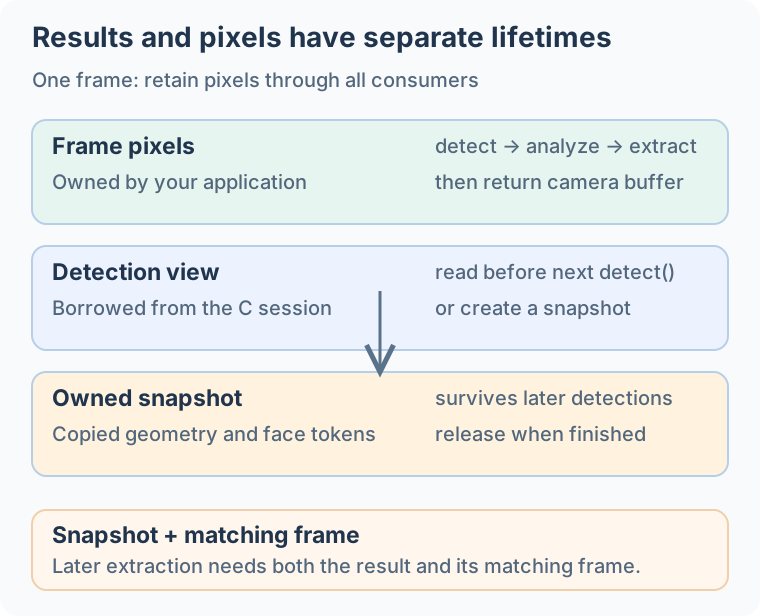
The C API's raw-buffer stream borrows memory owned by the application. Retain the camera buffer until every consumer has finished. For queued work, keep the buffer alive or copy the pixels before returning it to the camera.
| Data | Safe handling |
|---|---|
| Camera bytes | Retain until every operation using that frame has finished. |
| C detection view | Consume before the next tracking call, or copy/use an owned snapshot. |
| Owned detection snapshot | Retains detection data until released; keep the source pixels separately. |
| Borrowed feature cache | Copy it before another extraction, or extract into an owned feature. |
| Python face/feature objects | The wrapper copies tokens and feature arrays; keep the corresponding image separately. |
| Capture candidate | Use its frame ID to find the original frame retained by your application. |
Choosing how to keep results
Snapshots copy detection results into owned storage. Their explicit lifetime makes them easier to retain or process later and reduces lifetime mistakes, at the cost of copying work and added latency. Keep the matching frame pixels separately.
When using the C API directly, a single video stream processed in order can use the borrowed results from HFExecuteFaceTrack to avoid this copy. Finish reading them before the next tracking call. Later calls may overwrite these results, so do not retain them across frames or reuse them between interleaved calls.
Java object lifetimes
The JVM binding uses long values for session, stream, bitmap, snapshot and capture handles. A Java reference or garbage collection does not release these resources; call the matching HFRelease… function in finally. A feature allocated by HFCreateFaceFeature supports try-with-resources through HFFaceFeature.close().
| Data | Safe handling |
|---|---|
| Java-owned direct image buffer | JNI retains it until the stream is released or its input is replaced. Finish processing before changing the bytes. |
| Bitmap pixel view | The ByteBuffer borrows native pixels. Keep the bitmap alive while any stream or operation uses this view. |
| Tracking / pipeline result | Some metadata is copied into Java fields; token bytes and numeric result buffers can still borrow session storage. Read them before the next call that replaces the data. |
| Detection snapshot | Keeps copied detection data until HFReleaseFaceResultSnapshot; retain the corresponding pixels separately. |
| Owned feature | Release only features created with HFCreateFaceFeature. A borrowed extraction or FeatureHub feature must not be released as an owned feature. |
Use one session per serial worker and coordinate runtime and FeatureHub changes across workers. If another thread needs a result, copy the values it needs before submitting the next frame. See Java integration for buffer rules and cleanup examples.
Android object lifetimes
Android 1.2.4.post1 provides two calling styles. The InspireFace facade returns Java-owned face arrays, tokens and feature copies. com.insightface.sdk.inspireface.jni.Native preserves C handles and borrowed-buffer lifetimes. Identify which layer produced a result before retaining it across frames.
| Object / view | What stays valid |
|---|---|
Session / ImageStream | Implement AutoCloseable; use try-with-resources or call close() when the worker finishes. |
InspireFace.ExecuteFaceTrack result | Arrays, pose and tokens are copied Java values that survive later tracking. Keep the corresponding pixels for later feature extraction. |
FaceDetectionSnapshot.getFaces() | Returns a Java-owned copy that can be read after snapshot close; still close the snapshot itself. |
FaceCapture.getResults() | Tokens and metadata are copied; cache selected images separately by frame ID. |
Native.HFExecuteFaceTrack result | ByteBuffer fields can borrow session storage. Consume them before replacement/release, or create an owned snapshot. |
Release streams created by InspireFace.CreateImageStreamFromBitmap / CreateImageStreamFromByteBuffer with ImageStream.close() or InspireFace.ReleaseImageStream. Release streams created by Native.HFCreateImageStream with Native.HFReleaseImageStream. The layers retain input buffers differently; do not cross their release paths.
Stop input and finish workers, then close capture objects, snapshots and streams before closing sessions and terminating the runtime. Serialize calls on each session and coordinate FeatureHub and global model state. See Android integration for complete examples.
Apple object lifetimes
Objective-C IFSession and Swift FaceSession own native session handles. ARC releases them when the wrapper is deallocated; call close() in Swift or closeWithError: in Objective-C when a camera worker or operation ends so resources are released at a known point. Closing an object invalidates its native storage even if another strong reference still points to the wrapper.
| Object / view | What stays valid |
|---|---|
| Raw-buffer image stream | The stream borrows pixels. The caller keeps the allocation alive and unchanged throughout processing. |
CVPixelBuffer image stream | The wrapper retains and locks the buffer until the stream closes or replaces its input. Supported layouts must be tightly packed. |
withUnsafeFaces / withBorrowedFacesFromStream | Read faces and run same-frame analysis inside the callback. Do not retain its pointers or start another tracking call there. |
FaceSnapshot / IFFaceSnapshot | Owns copied detection data until closed; it does not retain the source image pixels. |
FaceFeatureBuffer / IFFeatureBuffer | Owns the feature allocation. borrowedFeature points into it and expires on close. |
| Capture and FeatureHub result views | Copy values needed later before another operation can replace their underlying storage. |
Swift's scoped helpers expose UnsafeBufferPointer views without allocating arrays. Use Array(view) when a value copy is needed; copying token structs alone does not copy the token bytes. For deferred face processing, retain a snapshot and its matching frame. An image bitmap's snapshotStream is a separate operation that copies pixels.
Keep a session and its camera queue on one serial worker. The wrapper does not make shared native state thread-safe; coordinate process-wide runtime and FeatureHub changes as well. Finish workers before closing their objects or terminating the runtime. Direct C calls using exposed handles bypass the wrapper's scoped-access checks.
A useful worker layout
application startup
  load resource pack
  enable gallery if needed
  create one session per worker

camera worker
  receive frame
  create/update stream
  detect or track
  run analysis / extract features for that frame
  copy results needed by another worker
  release stream / return camera buffer

application shutdown
  stop incoming frames and join workers
  release capture objects and sessions
  disable gallery
  terminate SDK
The application handles camera capture and queue scheduling. Use a bounded queue; for an interactive preview, discard old unprocessed frames to keep up with the live input.
Where InspireCV fits
InspireCV provides image storage, geometry, drawing and preprocessing. Its task::Pipeline can write camera inputs into image or tensor buffers. InspireFace also has its own FrameProcess wrapper under the inspirecv namespace.
Current source builds enable Task preprocessing with ISF_ENABLE_INSPIRECV_TASK_PREPROCESS=ON by default; set it to OFF to use the earlier preprocessing path.
Backends
Choose an MNN, TensorRT, CoreML or Rockchip RKNN build together with its matching model pack and runtime libraries. Configure image preprocessing separately; Rockchip RGA handles supported image conversion and transform operations.
See models and builds, image inputs and recognition for the practical setup details.
