
iOS
iOS applications can use Objective-C, Swift or the C API. The current Apple build provides paired XCFrameworks for device and simulator targets. Start by detecting a bundled image, then reuse the session for camera frames.
The shared Objective-C and Swift guide contains a complete detection example, error handling and resource ownership. This page covers Xcode setup and the camera input path.
Choose the frameworks
Download inspireface-apple-1.2.4.zip. This CPU package includes the iOS device, simulator and macOS frameworks, with Objective-C and Swift interfaces. The extracted directory contains:
inspireface-apple-1.2.4/
  InspireFace.xcframework/
  InspireFaceSwift.xcframework/
  Frameworks/                 # Frameworks grouped by platform
  SDKs/                       # Individual architecture SDKs
  sdk-manifest.json
Xcode chooses the matching slice when linking an XCFramework. The published 1.2.4 package has these iOS deployment targets:
| Platform | Architecture | Minimum OS |
|---|---|---|
| iOS device | arm64 | iOS 11.0 |
| iOS Simulator | arm64 | iOS 14.0 |
| iOS Simulator | x86_64 | iOS 11.0 |
Set the app's deployment target for the selected slice. To change the build configuration or enable CoreML, follow Build for iOS.
Add the SDK and model to Xcode
Add InspireFace.xcframework to the app target. Swift code using import InspireFaceSwift also needs InspireFaceSwift.xcframework from the same build. The iOS slices are static: link them with Do Not Embed. Add -ObjC to Other Linker Flags so Objective-C wrapper classes are retained.
The core framework already includes its CPU inference dependency. Do not also link the old MNN.framework, a second libMNN.a, or the raw libInspireFace.a alongside it. The SDKs/ directory keeps the old raw-library route for existing C/C++ projects; choose one integration route for each target.
Check the target settings
| Xcode setting | Value or action |
|---|---|
| Frameworks, Libraries, and Embedded Content | Add the core XCFramework; add the Swift XCFramework for Swift. Both use Do Not Embed on iOS. |
| Other Linker Flags | Keep $(inherited) and add -ObjC. |
| System libraries | Foundation, CoreVideo and libc++; CoreML builds also use CoreML and Accelerate. Module imports supply these links automatically. |
| Framework Search Paths | For direct .framework integration, point to the directory for the selected platform and architecture. |
| Copy Bundle Resources | Include the model file, for example Pikachu, with its original filename. |
| Info | Add NSCameraUsageDescription before requesting camera access. |
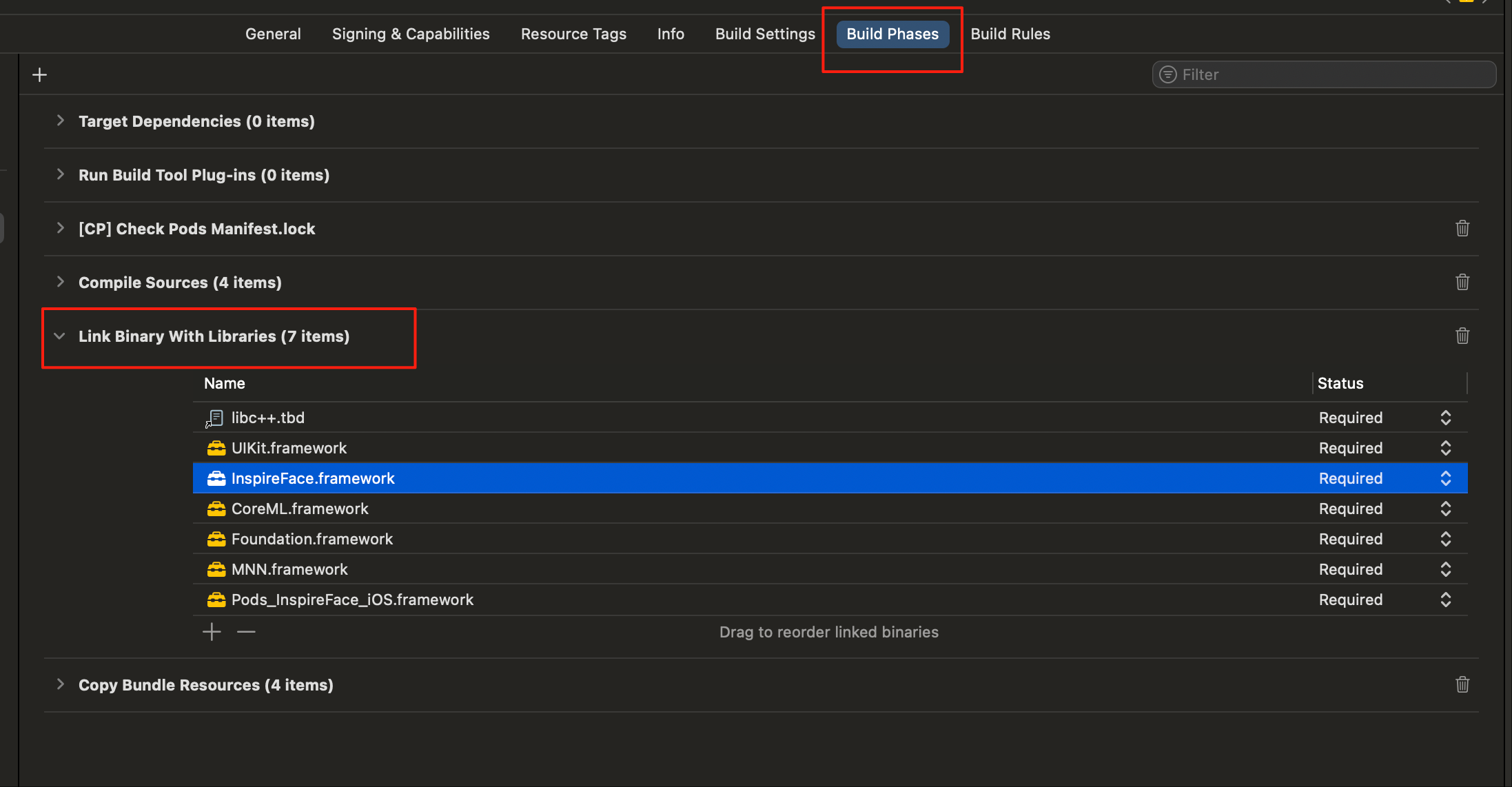
The screenshot shows the Build Phases location in an older example project. Add the current InspireFace frameworks listed above; its Pods entry is project-specific.
Resolve the model file once on the SDK worker. The snippets below belong inside the worker's initialization method; imports are shown in the shared guide.
NSString *modelPath = [[NSBundle mainBundle] pathForResource:@"Pikachu" ofType:nil];
if (!modelPath) {
    NSLog(@"Pikachu is missing from the app resources");
    return;
}
NSError *error = nil;
if (![IFRuntime launchAtPath:modelPath error:&error]) {
    NSLog(@"InspireFace launch failed: %@", error);
    return;
}
guard let modelPath = Bundle.main.path(forResource: "Pikachu", ofType: nil) else {
    throw NSError(domain: "App.Model", code: 1,
                  userInfo: [NSLocalizedDescriptionKey: "Pikachu is missing from the app resources"])
}
try InspireFaceRuntime.launch(path: modelPath)
For a downloaded model, use Application Support or another app-owned directory. Finish downloading before launch. Bundle resources are read-only, so copy a file into writable storage only if the app needs to replace it later.
Camera input and row stride
Request camera authorization, configure an AVCaptureSession, and add an AVCaptureVideoDataOutput whose delegate runs on the same serial queue as the face session. These settings request BGRA and discard late frames:
#import <AVFoundation/AVFoundation.h>

AVCaptureVideoDataOutput *output = [[AVCaptureVideoDataOutput alloc] init];
output.videoSettings = @{
    (NSString *)kCVPixelBufferPixelFormatTypeKey: @(kCVPixelFormatType_32BGRA)
};
output.alwaysDiscardsLateVideoFrames = YES;
dispatch_queue_t analysisQueue = dispatch_queue_create("app.face.analysis", DISPATCH_QUEUE_SERIAL);
// delegate implements AVCaptureVideoDataOutputSampleBufferDelegate.
[output setSampleBufferDelegate:delegate queue:analysisQueue];
import AVFoundation

let output = AVCaptureVideoDataOutput()
output.videoSettings = [
    kCVPixelBufferPixelFormatTypeKey as String: kCVPixelFormatType_32BGRA
]
output.alwaysDiscardsLateVideoFrames = true
let analysisQueue = DispatchQueue(label: "app.face.analysis")
// delegate implements AVCaptureVideoDataOutputSampleBufferDelegate.
output.setSampleBufferDelegate(delegate, queue: analysisQueue)
In captureOutput(_:didOutput:from:) or its Objective-C equivalent, obtain the frame with CMSampleBufferGetImageBuffer. Create a LIGHT_TRACK face session before starting capture and reuse it; do not launch the model or create a session for each callback.
The direct CVPixelBuffer initializer shown in the shared input example works only with tightly packed storage. Camera buffers often have extra bytes at the end of each row. The following complete helper copies BGRA rows, closes the stream before its storage leaves scope, and returns an owned count.
BGRA input with row padding: Objective-C and Swift
#import <InspireFace/InspireFaceApple.h>
#include <stdint.h>
#include <string.h>

BOOL CountPaddedBGRA(IFSession *session, CVPixelBufferRef buffer,
                     HFRotation rotation, HInt32 *faceCount, NSError **error) {
    *faceCount = 0;
    if (!buffer || CVPixelBufferGetPixelFormatType(buffer) != kCVPixelFormatType_32BGRA ||
        CVPixelBufferIsPlanar(buffer))
        return IFCheck(HERR_INVALID_IMAGE_STREAM_PARAM, error);
    size_t width = CVPixelBufferGetWidth(buffer);
    size_t height = CVPixelBufferGetHeight(buffer);
    if (!width || !height || width > INT32_MAX || height > INT32_MAX ||
        width > SIZE_MAX / 4 || height > SIZE_MAX / (width * 4))
        return IFCheck(HERR_INVALID_IMAGE_STREAM_PARAM, error);
    if (CVPixelBufferLockBaseAddress(buffer, kCVPixelBufferLock_ReadOnly) != kCVReturnSuccess)
        return IFCheck(HERR_INVALID_IMAGE_STREAM_PARAM, error);
    const uint8_t *source = CVPixelBufferGetBaseAddress(buffer);
    size_t rowBytes = width * 4;
    size_t stride = CVPixelBufferGetBytesPerRow(buffer);
    if (!source || stride < rowBytes) {
        CVPixelBufferUnlockBaseAddress(buffer, kCVPixelBufferLock_ReadOnly);
        return IFCheck(HERR_INVALID_IMAGE_STREAM_PARAM, error);
    }
    __attribute__((objc_precise_lifetime)) NSMutableData *packed =
        [NSMutableData dataWithLength:rowBytes * height];
    uint8_t *destination = packed.mutableBytes;
    for (size_t row = 0; row < height; ++row)
        memcpy(destination + row * rowBytes, source + row * stride, rowBytes);
    CVPixelBufferUnlockBaseAddress(buffer, kCVPixelBufferLock_ReadOnly);
    HFImageData input = {destination, (HInt32)width, (HInt32)height,
                         HF_STREAM_BGRA, rotation};
    IFImageStream *stream = [[IFImageStream alloc] initWithBorrowedData:input error:error];
    if (!stream) return NO;
    HFMultipleFaceData faces = {0};
    BOOL success = [session trackStream:stream borrowedResult:&faces error:error];
    if (success) *faceCount = faces.detectedNum;
    [stream closeWithError:NULL];
    return success;
}
import CoreVideo
import Foundation
import InspireFaceSwift

func countPaddedBGRA(session: FaceSession, pixelBuffer: CVPixelBuffer,
                     rotation: ImageRotation) throws -> Int {
    func invalidImage() -> NSError {
        NSError(domain: IFErrorDomain, code: Int(HERR_INVALID_IMAGE_STREAM_PARAM))
    }
    guard CVPixelBufferGetPixelFormatType(pixelBuffer) == kCVPixelFormatType_32BGRA,
          !CVPixelBufferIsPlanar(pixelBuffer) else { throw invalidImage() }
    let width = CVPixelBufferGetWidth(pixelBuffer)
    let height = CVPixelBufferGetHeight(pixelBuffer)
    guard width > 0, height > 0, let w = Int32(exactly: width),
          let h = Int32(exactly: height) else { throw invalidImage() }
    let (rowBytes, rowOverflow) = width.multipliedReportingOverflow(by: 4)
    let (byteCount, countOverflow) = rowBytes.multipliedReportingOverflow(by: height)
    guard !rowOverflow, !countOverflow, byteCount <= Int(Int32.max),
          CVPixelBufferLockBaseAddress(pixelBuffer, .readOnly) == kCVReturnSuccess
    else { throw invalidImage() }
    var packed = Data(count: byteCount)
    do {
        defer { CVPixelBufferUnlockBaseAddress(pixelBuffer, .readOnly) }
        guard let source = CVPixelBufferGetBaseAddress(pixelBuffer),
              CVPixelBufferGetBytesPerRow(pixelBuffer) >= rowBytes
        else { throw invalidImage() }
        let stride = CVPixelBufferGetBytesPerRow(pixelBuffer)
        packed.withUnsafeMutableBytes { (bytes: UnsafeMutableRawBufferPointer) in
            for row in 0..<height {
                bytes.baseAddress!.advanced(by: row * rowBytes).copyMemory(
                    from: source.advanced(by: row * stride), byteCount: rowBytes)
            }
        }
    }
    return try packed.withUnsafeMutableBytes { (bytes: UnsafeMutableRawBufferPointer) in
        try ImageStream.withBorrowedBytes(
            bytes, width: w, height: h, format: .bgra, rotation: rotation
        ) { stream in
            try session.withUnsafeFaces(in: stream) { $0.count }
        }
    }
}
Call CountPaddedBGRA / countPaddedBGRA from the analysis callback with the reused session. The helper allocates one packed buffer per call for clarity; for continuous processing, keep a scratch buffer on the same worker and resize it only when the frame dimensions change. The buffer must remain unchanged until all operations on that frame finish.
NV12 can use less input bandwidth than BGRA. For direct input, both planes must be tightly packed and contiguous. Otherwise copy Y and UV row by row using their own strides, or convert explicitly to the format chosen by the app. See image inputs for rotation and coordinate conventions.
Session and UI lifetime
Run tracking, feature extraction and pipeline analysis sequentially for a frame. Copy rectangles and scores before dispatching them to the main queue. Apply the preview's rotation, scaling, crop and front-camera mirroring to those coordinates; the SDK result is not automatically expressed in UIKit view coordinates.
On camera shutdown, stop new callbacks, drain the analysis queue, close any capture policy and session, and then terminate the runtime if nothing else uses it. A CVPixelBuffer stream holds the camera buffer locked until it closes, so release it promptly after processing.
Apple acceleration
The published 1.2.4 Apple package uses CPU inference. For CoreML, build the Apple extension. CPU and CoreML packages use the same module names; choose one package for the target. The CoreML build also needs the corresponding Apple model resources; simply switching frameworks does not convert a CPU model pack.
Use IFRuntime / InspireFaceRuntime to select the CoreML mode before creating sessions. See CoreML runtime modes for CPU, GPU and Neural Engine configuration. Measure on physical devices: simulator compatibility checks do not represent camera latency, power use or Neural Engine performance.