
Python
Python 接口可直接处理 NumPy 图像,完成人脸检测、特征提取和可选分析。快速开始示例演示如何读取图片并保存检测结果。
安装
python -m pip install inspireface opencv-python
初始化一次,复用会话
import cv2
import inspireface as isf

image = cv2.imread("face.jpg")
if image is None:
    raise FileNotFoundError("face.jpg")

isf.launch("Pikachu")  # Downloads the model on first use.
session = None
try:
    session = isf.InspireFaceSession(
        isf.HF_ENABLE_FACE_RECOGNITION | isf.HF_ENABLE_QUALITY,
        isf.HF_DETECT_MODE_ALWAYS_DETECT,
        max_detect_num=10,
        detect_pixel_level=320,
    )
    faces = session.face_detection(image)
    for face in faces:
        print(face.location, face.detection_confidence)
finally:
    if session is not None:
        session.release()
    isf.terminate()
首次调用 launch("Pikachu") 时会按需下载模型。已有本地模型时,使用 launch(resource_path="/path/to/Pikachu")。finally 保证处理失败时也会释放会话。
摄像头应用在帧循环外创建会话。每个独立序列或工作线程使用一个会话,并保持该会话中的处理顺序。
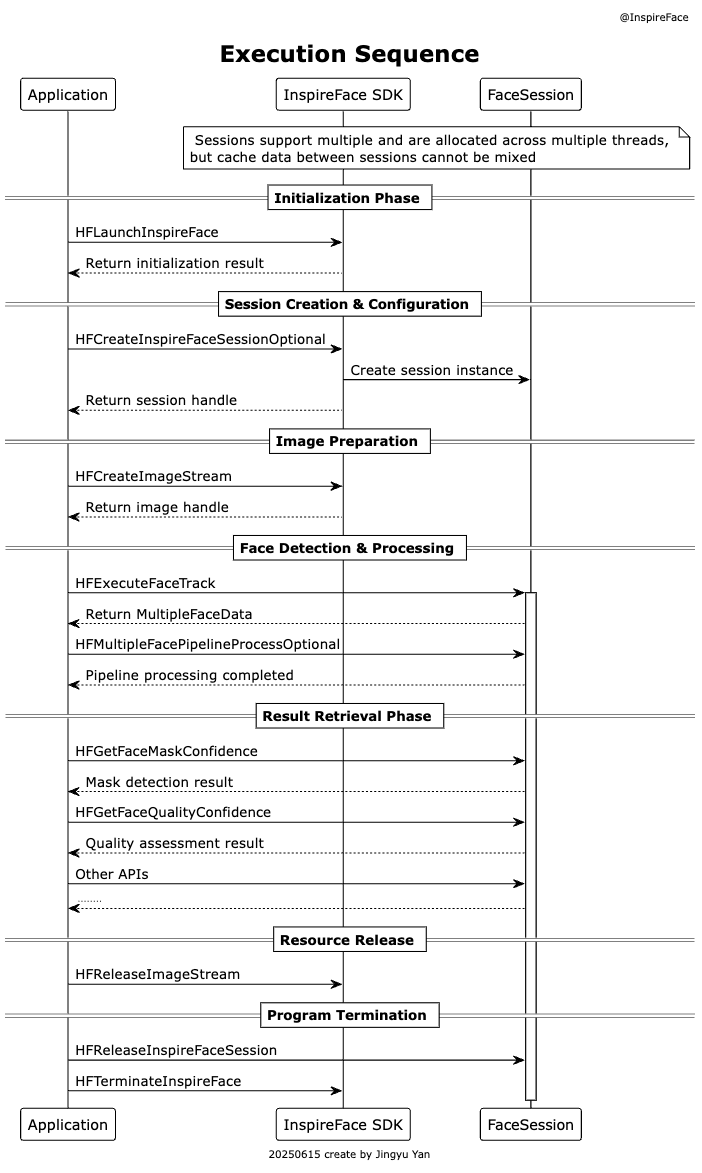
处理视频时,复用会话并重复逐帧部分。工作线程结束后关闭会话,所有会话关闭后再调用 terminate()。每个工作线程按顺序处理自己的会话。
检测结果
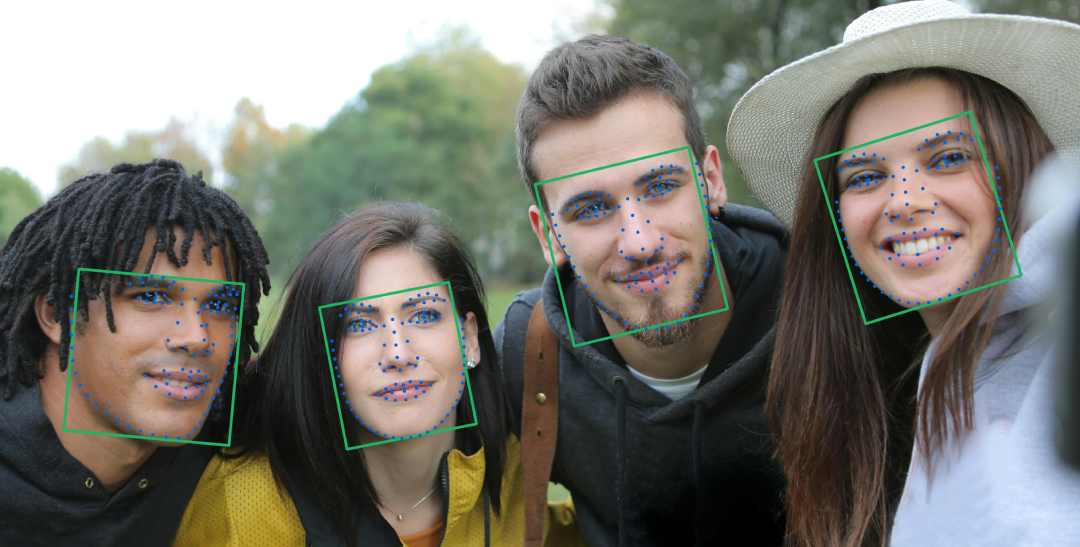
face_detection 接受图像数组或 ImageStream,返回列表。空列表表示没有通过检测的人脸。
| Field | 说明 |
|---|---|
location | (x1, y1, x2, y2) 人脸框,宽度为 x2 - x1。 |
detection_confidence | 检测评分。 |
track_id | 用于在同一跟踪会话内关联人脸的 ID。 |
track_count | 跟踪次数,供抓拍等时序策略使用。 |
roll、yaw、pitch | 姿态字段,需要时启用 HF_ENABLE_FACE_POSE。 |
封装会将每个人脸 token 复制到 Python 持有的内存中。后续还要提取特征或运行 Pipeline 时,一同保留对应源图像。
可选分析
创建会话时启用选项,执行流水线时再次请求:
options = isf.HF_ENABLE_QUALITY | isf.HF_ENABLE_MASK_DETECT
session = isf.InspireFaceSession(options)
try:
    faces = session.face_detection(image)
    if faces:
        results = session.face_pipeline(image, faces, options)
        for face, result in zip(faces, results):
            print(face.location, result.quality_confidence, result.mask_confidence)
finally:
    session.release()
此代码使用已启动的 SDK,image 是 BGR 数组。请求会话已启用的部分或全部选项,再按输入人脸顺序读取返回列表中的对应字段。
| Flag | FaceExtended fields |
|---|---|
HF_ENABLE_QUALITY | quality_confidence |
HF_ENABLE_MASK_DETECT | mask_confidence |
HF_ENABLE_LIVENESS | rgb_liveness_confidence |
HF_ENABLE_INTERACTION | left_eye_status_confidence, right_eye_status_confidence, action_normal, action_blink, action_jaw_open, action_shake, action_head_raise |
HF_ENABLE_FACE_ATTRIBUTE | race, gender, age_bracket |
HF_ENABLE_FACE_EMOTION | emotion |
属性和表情标签顺序
检查类别索引范围后,按下面的数组映射标签。这些类别是模型根据输入图像给出的预测。
race_labels = ["Black", "Asian", "Latino/Hispanic", "Middle Eastern", "White"]
gender_labels = ["Female", "Male"]
age_labels = ["0–2", "3–9", "10–19", "20–29", "30–39", "40–49", "50–59", "60–69", "70+"]
emotion_labels = ["Neutral", "Happy", "Sad", "Surprise", "Fear", "Disgust", "Anger"]
各项功能的完整示例与结果含义见可选分析。
RGB 活体检测
请求 HF_ENABLE_LIVENESS,读取 rgb_liveness_confidence。完整流程与阈值说明见活体检测。
人脸动作检测
在跟踪会话中请求 HF_ENABLE_INTERACTION,对连续帧执行分析。眼睛状态接近 1 表示睁眼,接近 0 表示闭眼。应用根据动作事件推进提示、超时和重试流程。
关键点与特征向量
# The session has recognition enabled and faces came from image.
if len(faces) == 1:
    five_points = session.get_face_five_key_points(faces[0])
    dense_points = session.get_face_dense_landmark(faces[0])
    embedding = session.face_feature_extract(image, faces[0])
    print(five_points.shape, dense_points.shape, embedding.shape)
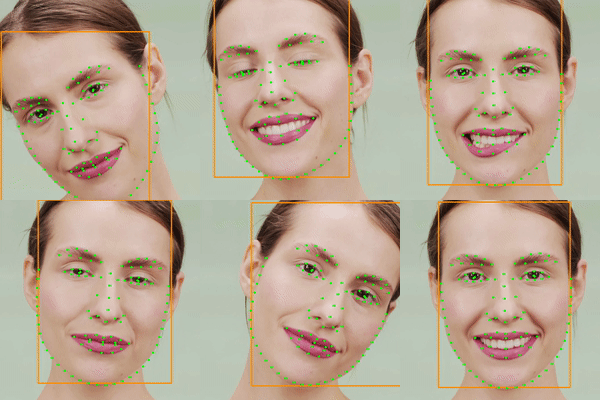
关键点以坐标数组返回,特征向量以复制后的 NumPy 数组返回。保存向量时同时记录模型标识,特征比对与阈值使用见两张图像比对示例。
原始缓冲区与 ImageStream
下文的上下文管理器和快照示例使用 1.2.4 封装与配套原生库。如果已安装的包尚未包含这些接口,按本地构建接入准备。
直接传入三通道 uint8 数组时,按 BGR 处理,与 cv2.imread 的输出一致。四通道数组按 BGRA 处理。使用其他像素格式时,在创建图像流时指定:
with isf.ImageStream.load_from_cv_image(
    rgb_image,
    stream_format=isf.HF_STREAM_RGB,
    rotation=isf.HF_CAMERA_ROTATION_0,
) as stream:
    faces = session.face_detection(stream)
HF_STREAM_RGB 对应 RGB 像素。如果图像采用其他通道顺序,在创建图像流前先转换。紧密排列的 NV21 缓冲区可以这样传入:
with isf.ImageStream.load_from_buffer(
    nv21_bytes, width, height,
    isf.HF_STREAM_YUV_NV21,
    isf.HF_CAMERA_ROTATION_0,
) as stream:
    faces = session.face_detection(stream)
NV12、NV21 和 I420 要求宽高为偶数。图像流保留对输入内存的引用,连续可变输入可能不经复制直接共享,处理结束前保持其大小与内容不变。不连续的 NumPy 输入会复制为连续存储。步长、缓冲区大小和旋转见图像输入。
快照与抓拍
session.face_detection_snapshot(image) 返回具有独立生命周期的快照,也可以传入抓拍更新。对每个新帧创建快照,持续更新跟踪状态。
with session.face_detection_snapshot(image) as snapshot:
    for face in snapshot.faces:
        print(face.track_id, face.track_count)
通过人脸抓拍选择稳定人脸和少量合适的帧。由应用的相机线程送入图像,并保留抓拍策略选中的候选帧。
在应用中处理异常
封装针对无效缓冲区、功能不可用、处理失败和资源问题抛出带类型的异常:
try:
    faces = session.face_detection(image)
except isf.InspireFaceError as error:
    print(error.error_code, error.error_name, str(error))
    raise
将空人脸列表作为正常检测结果处理,处理异常则单独报告。错误日志中记录模型包、原生版本、输入形状和启用选项。
使用本地原生构建
替换原生库、制作和验证 wheel 的完整步骤见 Python 打包。使用快照、抓拍等开发版接口时,Python 封装与原生库应来自同一次构建。
wheel 自带原生库。使用 1.2.4 封装加载本地构建时,在导入 inspireface 之前设置 INSPIREFACE_LIBRARY_PATH:
# Run from an InspireFace checkout, inside your virtual environment.
python -m pip install -e ./python
export INSPIREFACE_LIBRARY_PATH=/absolute/path/to/libInspireFace.so
python -c 'import inspireface as isf; print(isf.version())'
macOS 使用 SDK 中 InspireFace/lib/ 下的原生 libInspireFace.dylib,也可以按 macOS 构建指南生成动态库。Objective-C 和 Swift Framework 用于 Apple 应用 target,不能直接替换 Python 加载的这个库文件。库架构必须与运行中的 Python 进程一致;即使设备是 Apple Silicon,通过 Rosetta 运行的 Intel Python 仍需 Intel 库。
安装原生库时,一并准备对应后端的运行依赖。具体步骤见 Rockchip Python 和 TensorRT。
固定可以复现的运行环境
记录可用环境时,把解释器、Python 封装、原生库和模型包一起记录。可以先运行:
python -c 'import platform, sys; print(sys.executable); print(platform.machine())'
python -m pip show inspireface
python -c 'import inspireface as isf; print(isf.version())'
包元数据给出 Python 发行包版本,isf.version() 返回实际加载的原生运行库版本。使用自定义构建时两者都应记录。在 Notebook 中,库路径环境变量需要在首次导入前设置;更换原生库后重启 kernel。
| Deployment item | 用途 |
|---|---|
| Virtual environment | 将封装与 NumPy 依赖同其他应用隔离。 |
| Native library and dependencies | 与 Python 进程架构及所选后端匹配。 |
| Model pack | 作为 resource_path 传入的可读本地文件。 |
| Input assets | 接入摄像头前,用格式与方向明确的图片验证流程。 |
离线部署
离线部署时,提前将 Python 包和模型包复制到目标设备,再向 launch 传入本地模型路径。保存识别数据库时,一并记录模型包名称与版本。
完整的命令行示例
检测并保存结果
将代码保存为 detect.py,运行后打印检测结果,并将带有人脸框的图像保存为 detected.jpg。
detect.py — 完整代码
"""Detect faces in one image and save an annotated copy."""
import argparse
from pathlib import Path

import cv2
import inspireface as isf


def main():
    parser = argparse.ArgumentParser(description=__doc__)
    parser.add_argument("image", type=Path)
    parser.add_argument("--model", type=Path, help="Path to an unpacked resource pack")
    parser.add_argument("--output", type=Path, default=Path("detected.jpg"))
    args = parser.parse_args()

    image = cv2.imread(str(args.image))
    if image is None:
        parser.error(f"Cannot read image: {args.image}")
    if args.model is None:
        isf.launch("Pikachu")  # Downloads the model on first use.
    else:
        isf.launch(resource_path=str(args.model))

    session = None
    try:
        session = isf.InspireFaceSession(
            isf.HF_ENABLE_NONE, isf.HF_DETECT_MODE_ALWAYS_DETECT,
            max_detect_num=10, detect_pixel_level=320,
        )
        faces = session.face_detection(image)
        print(f"Detected {len(faces)} faces")
        output = image.copy()
        for face in faces:
            x1, y1, x2, y2 = face.location
            cv2.rectangle(output, (x1, y1), (x2, y2), (60, 170, 80), 2)
            print(face.location, face.detection_confidence)
        if not cv2.imwrite(str(args.output), output):
            raise RuntimeError(f"Cannot write image: {args.output}")
        print(f"Saved {args.output}")
    finally:
        if session is not None:
            session.release()
        isf.terminate()


if __name__ == "__main__":
    main()
python detect.py /path/to/face.jpg --model /path/to/Pikachu --output detected.jpg
比对两张图像
将代码保存为 compare.py。每张图像需恰好包含一张人脸,程序输出余弦相似度、模型推荐阈值,以及分数是否达到阈值。
compare.py — 完整代码
"""Compare two images that each contain exactly one face."""
import argparse
import cv2
import inspireface as isf


def main():
    parser = argparse.ArgumentParser(description=__doc__)
    parser.add_argument("first")
    parser.add_argument("second")
    parser.add_argument("--model", required=True)
    args = parser.parse_args()
    images = [cv2.imread(path) for path in (args.first, args.second)]
    if any(image is None for image in images):
        parser.error("Both image paths must be readable")

    isf.launch(resource_path=args.model)
    session = None
    try:
        session = isf.InspireFaceSession(
            isf.HF_ENABLE_FACE_RECOGNITION, isf.HF_DETECT_MODE_ALWAYS_DETECT,
            max_detect_num=10, detect_pixel_level=320,
        )
        features = []
        for image in images:
            faces = session.face_detection(image)
            if len(faces) != 1:
                raise ValueError(f"Expected exactly one face; found {len(faces)}")
            features.append(session.face_feature_extract(image, faces[0]))
        similarity = isf.feature_comparison(features[0], features[1])
        threshold = isf.get_recommended_cosine_threshold()
        print(f"Cosine similarity: {similarity:.4f}")
        print(f"Model threshold: {threshold:.4f}")
        print(f"Above threshold: {similarity >= threshold}")
    finally:
        if session is not None:
            session.release()
        isf.terminate()


if __name__ == "__main__":
    main()
python compare.py /path/to/first.jpg /path/to/second.jpg --model /path/to/Pikachu
视频帧处理见跟踪,内存与持久化特征库见 FeatureHub。这些页面均提供正文代码示例。