
Select a face from video
Face capture selects usable images from a video sequence. It checks face position, size and stability over time, then keeps the best candidates. Use it for enrollment, profile photos or other flows that need a small set of face images.
These examples use the capture and snapshot APIs in 1.2.4. Use wrapper classes, headers and native libraries from the same version. For Android, build the Java classes and JNI library together from 1.2.4.
How capture progresses
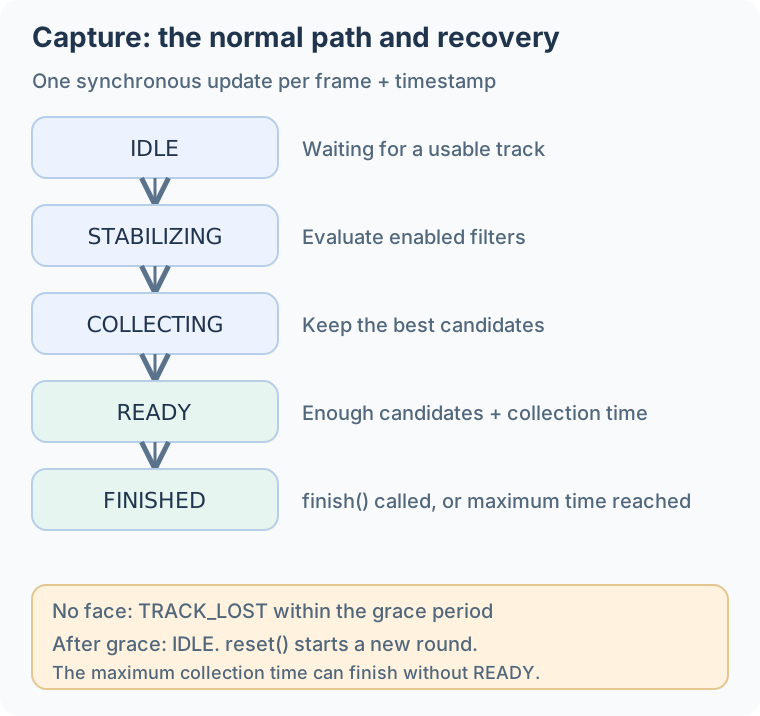
Text version of the main flow
Frame + timestamp → Track faces → Evaluate enabled filters
                                      ↓
                 IDLE → STABILIZING → COLLECTING → READY
                            ↑                         ↓
                       Retry / reset              finish()
                                                  FINISHED
Each update evaluates one input frame synchronously. The application opens the camera, schedules processing and displays prompts. Loss of the tracked face can enter TRACK_LOST; the configured grace period and a new stable track determine recovery. Call reset() to start a fresh capture round.
Start with the default policy
The SDK and a HF_DETECT_MODE_LIGHT_TRACK session are already open. Create capture once, call update_capture for each valid stream, then release capture before its parent session. A maximum of eight results fits the current outputCount limit.
#include <stdio.h>
#include <inspireface.h>

static HResult create_capture(HFSession session, HFFaceCaptureSession *capture) {
    HFFaceCaptureConfig config = {0};
    HResult status = HFGetDefaultFaceCaptureConfig(&config);
    if (status != HSUCCEED) return status;
    return HFCreateFaceCaptureSession(session, &config, capture);
}

static HResult update_capture(HFFaceCaptureSession capture, HFImageStream stream,
                              HFUInt64 frame_id, HFUInt64 timestamp_ms,
                              HFFaceCaptureProgress *progress) {
    HResult status = HFUpdateFaceCaptureSession(
        capture, stream, frame_id, timestamp_ms, progress);
    if (status != HSUCCEED) return status;
    printf("state=%d reject=%llu\n", progress->state,
           (unsigned long long)progress->rejectReasons);
    if (progress->state == HF_CAPTURE_STATE_READY) {
        status = HFFinishFaceCaptureSession(capture, progress);
        if (status != HSUCCEED) return status;
    }
    HFFaceCaptureResult results[8];
    HFUInt32 count = 0;
    status = HFGetFaceCaptureResults(capture, results, 8, &count);
    if (status != HSUCCEED) return status;
    for (HFUInt32 i = 0; i < count; ++i) {
        printf("candidate=%llu score=%.3f\n",
               (unsigned long long)results[i].frameId, results[i].score);
    }
    // Retain matching candidate images in the application (see below).
    return HSUCCEED;
}
// End of the round: HFReleaseFaceCaptureSession(capture);
C++ exposes FaceCaptureSelector independently of the session. Its update consumes the current frame and the tracking results you provide. Keep both objects and call updateCapture(frame, frameId, timestampMs) for each frame.
inspire::CustomPipelineParameter options;
auto session = inspire::Session::Create(
    inspire::DETECT_MODE_LIGHT_TRACK, 5, options, 320);
inspire::FaceCaptureSelector capture;
inspire::FaceCaptureConfig config;
if (capture.Configure(config, options) != 0) {
    throw std::runtime_error("Cannot configure capture");
}
auto updateCapture = [&](inspirecv::FrameProcess& frame,
                         uint64_t frameId, uint64_t timestampMs) {
    std::vector<inspire::FaceTrackWrap> faces;
    if (session.FaceDetectAndTrack(frame, faces) != 0) {
        throw std::runtime_error("Tracking failed");
    }
    inspire::FaceCaptureUpdate progress;
    if (capture.Update(frame, faces, frameId, timestampMs, progress) != 0) {
        throw std::runtime_error("Capture update failed");
    }
    if (progress.state == inspire::CAPTURE_STATE_READY) {
        if (capture.Finish(progress) != 0) throw std::runtime_error("Capture finish failed");
    }
    for (const auto& candidate : capture.GetResults()) {
        std::cout << candidate.frameId << " " << candidate.score << '\n';
    }
    return progress.state;
};
Use an open LIGHT_TRACK session with maximumFaces greater than one. Create capture once, then call UpdateCapture per frame on the same serial worker. BOOL/NSError report errors; progress reports capture state. Results contain borrowed tokens, so consume them before the next update, reset, finish or close.
#import <InspireFace/InspireFaceApple.h>

static IFCaptureSession *CreateCapture(IFSession *session, NSError **error) {
    HFFaceCaptureConfig config = {0};
    if (![IFCaptureSession getDefaultConfiguration:&config error:error]) return nil;
    return [[IFCaptureSession alloc] initWithSession:session configuration:config error:error];
}

static BOOL UpdateCapture(IFCaptureSession *capture, IFImageStream *stream,
                          uint64_t frameID, uint64_t timestampMS,
                          HFFaceCaptureProgress *progress, NSError **error) {
    if (![capture updateStream:stream frameID:frameID timestampMilliseconds:timestampMS
        progress:progress error:error]) return NO;
    if (progress->state == HF_CAPTURE_STATE_READY &&
        ![capture finishWithProgress:progress error:error]) return NO;
    HFFaceCaptureResult results[HF_FACE_CAPTURE_MAX_RESULTS];
    uint32_t count = 0;
    if (![capture getResults:results capacity:HF_FACE_CAPTURE_MAX_RESULTS
        count:&count error:error]) return NO;
    for (uint32_t i = 0; i < count; ++i) {
        NSLog(@"candidate=%llu score=%.3f", (unsigned long long)results[i].frameId,
            results[i].score);
    }
    return YES;
}
// Stop updating when progress.state == HF_CAPTURE_STATE_FINISHED.
// Close capture before session: [capture closeWithError:&error];
Create the parent session with .lightTracking and maximumFaces: 5. Reuse one capture object and one result buffer across frames, then deallocate the buffer and close capture before closing the session. Stop the loop when the returned state equals Int32(HF_CAPTURE_STATE_FINISHED.rawValue). results(into:) copies descriptors, while their token payloads remain borrowed.
import InspireFaceSwift

func createCapture(session: FaceSession) throws -> FaceCaptureSession {
    try FaceCaptureSession(session: session,
                           configuration: FaceCaptureSession.defaultConfiguration())
}

func updateCapture(capture: FaceCaptureSession, stream: ImageStream,
                   frameID: UInt64, timestampMS: UInt64,
                   results: UnsafeMutableBufferPointer<HFFaceCaptureResult>) throws
    -> HFFaceCaptureProgress {
    var progress = HFFaceCaptureProgress()
    try capture.update(stream, frameID: frameID,
                       timestampMilliseconds: timestampMS, progress: &progress)
    if progress.state == Int32(HF_CAPTURE_STATE_READY.rawValue) {
        try capture.finish(progress: &progress)
    }
    let count = try capture.results(into: results)
    for i in 0..<count {
        print("candidate=\(results[i].frameId) score=\(results[i].score)")
    }
    return progress
}
// Allocate once for the frame loop; pass this buffer to updateCapture.
func makeCaptureResultBuffer() -> UnsafeMutableBufferPointer<HFFaceCaptureResult> {
    .allocate(capacity: Int(HF_FACE_CAPTURE_MAX_RESULTS))
}
// After the loop: results.deallocate(); try capture.close(); try session.close()
Use the 1.2.4 FaceCapture classes and matching JNI library with an open tracking Session. Import FaceCapture from com.insightface.sdk.inspireface and its result/config types from .base. The update helper runs once per frame; close the capture after the camera worker stops.
static FaceCapture createCapture(Session session) {
    return FaceCapture.create(session, FaceCapture.defaultConfig());
}

static FaceCaptureProgress updateCapture(FaceCapture capture, ImageStream stream,
                                         long frameId, long timestampMs) {
    FaceCaptureProgress progress = capture.update(stream, frameId, timestampMs);
    System.out.println(progress.state + " " + progress.rejectReasons);
    if (progress.state == FaceCapture.STATE_READY) {
        progress = capture.finish();
    }
    for (FaceCaptureResult candidate : capture.getResults()) {
        System.out.println(candidate.frameId + " " + candidate.score);
    }
    return progress;
}
// At the end of the round: capture.close();
// Then release the parent session and remaining image streams.
Use an open LIGHT_TRACK session with maxFaces greater than one. Create capture once, then call the update helper for each frame. Stop the frame loop before calling capture.close(), and close capture before its parent session. The caller owns each input stream.
import { FaceCaptureProgress, FaceCaptureSession, FaceCaptureState,
         ImageStream, Session } from '@hyperinspire/inspireface';

export function createCapture(session: Session): FaceCaptureSession {
  return new FaceCaptureSession(session, FaceCaptureSession.getDefaultConfig());
}

export function updateCapture(capture: FaceCaptureSession, image: ImageStream,
                              frameId: number, timestampMs: number): FaceCaptureProgress {
  let progress = capture.update(image, frameId, timestampMs);
  console.info(`state=${progress.state}, rejected=${progress.rejectReasons}`);
  if (progress.state === FaceCaptureState.READY) {
    progress = capture.finish();
  }
  for (const candidate of capture.getResults()) {
    console.info(`frame=${candidate.frameId}, score=${candidate.score}`);
  }
  return progress;
}
Keep the context managers open for the entire frame loop; the single update below illustrates one iteration.
# The SDK is already launched. Requires the current 1.2.4 wrapper.
with isf.InspireFaceSession(
    isf.HF_ENABLE_NONE,
    isf.HF_DETECT_MODE_LIGHT_TRACK,
    max_detect_num=5,
    detect_pixel_level=320,
    auto_launch=False,
) as session:
    config = isf.FaceCaptureConfig.defaults()
    with session.create_face_capture(config) as capture:
        progress = capture.update(frame, frame_id=0, timestamp_ms=0)
        print(progress.state.name, progress.reject_reasons)
For Python, frame is a BGR array; native callers pass the corresponding image stream or FrameProcess. Capture evaluates a sequence, so keep submitting consecutive frames with strictly increasing frame IDs and timestamps in milliseconds. Use a monotonic clock for live capture and the video timeline for offline input.
Once capture reaches FINISHED, stop feeding frames for that round. Read the final results, or reset the capture object to begin another round.
A finished round can retain candidates even if it never reached READY. The example below saves a frame only after READY; a round that finishes earlier is reported as unsuccessful.
Set max_detect_num above 1 so the face-count filter can detect and reject frames with multiple faces.
| Default filter | What it checks |
|---|---|
| Face count | One face is available for capture. |
| Face size | Face width is within the configured fraction of the image width. |
| Position and boundary | The face is near the center and stays inside the frame. |
| Stability | Position and size have settled over a time interval. |
| Track count | The tracker has seen the face for enough updates. |
The current defaults request one output, at least five tracker observations, a 300 ms stable period and an 800 ms collection period. Read the default configuration through the API, then change the fields your application needs.
Keep the selected images
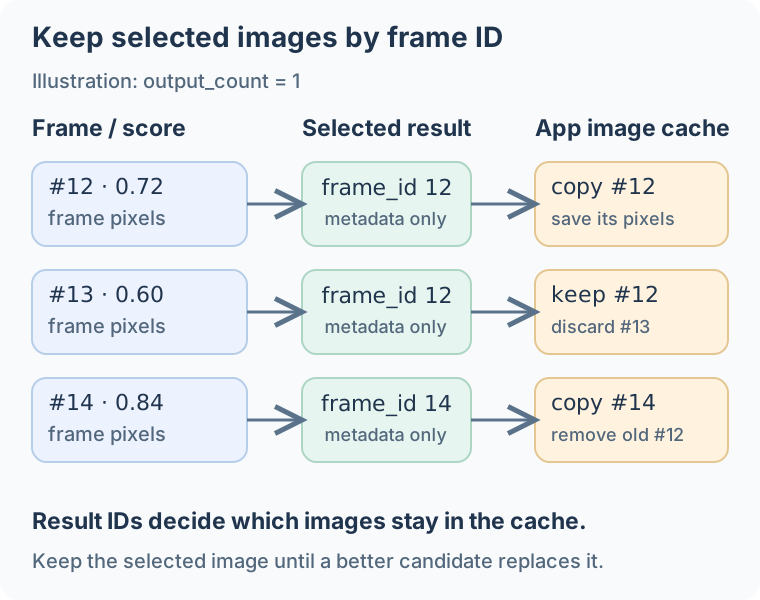
Capture results contain a frame ID, timestamp, score, face token and metrics. Store the selected image pixels in an application cache. Use the same cache strategy in each language: inspect current result IDs after every update, copy the current image only if its ID is selected, and remove entries no longer selected. On Apple, copy the selected source pixels into application-owned storage before the camera buffer is reused; keeping a face token does not keep the image. In C++, use Image::Clone(); in Android, copy the bitmap or camera bytes before the input buffer is reused. In ArkTS, copy selected camera bytes with new Uint8Array(bytes) and keep them by frameId. Here is the Python version:
# Inside the frame loop; candidates is an initially empty dictionary.
progress = capture.update(frame, frame_id, timestamp_ms)
results = capture.results()
kept_ids = {result.frame_id for result in results}
if frame_id in kept_ids:
    candidates[frame_id] = frame.copy()
candidates = {key: value for key, value in candidates.items() if key in kept_ids}

if progress.state == isf.FaceCaptureState.READY:
    capture.finish()
    selected = capture.results()[0]
    selected_frame = candidates[selected.frame_id]
elif progress.state == isf.FaceCaptureState.FINISHED:
    raise RuntimeError("Capture finished before becoming ready; start a new round")
This keeps the current candidates, bounded by output_count (up to eight). An older selected frame stays in the cache until a better candidate replaces it or the round ends.
Save the complete code below as capture.py, then pass the video path:
capture.py — complete code
"""Select a stable face frame from a video using InspireFace 1.2.4."""
import argparse
import math
from pathlib import Path

import cv2
import inspireface as isf


def main():
    parser = argparse.ArgumentParser(description=__doc__)
    parser.add_argument("video")
    parser.add_argument("--model", required=True)
    parser.add_argument("--output", default="captured.jpg")
    args = parser.parse_args()
    video = cv2.VideoCapture(args.video)
    if not video.isOpened():
        parser.error("Cannot open the input video")
    fps = video.get(cv2.CAP_PROP_FPS)
    if not math.isfinite(fps) or not 0 < fps <= 1000:
        video.release()
        parser.error("This example needs a video with a valid frame rate")

    launched = False
    try:
        isf.launch(resource_path=args.model)
        launched = True
        with isf.InspireFaceSession(
            isf.HF_ENABLE_NONE, isf.HF_DETECT_MODE_LIGHT_TRACK,
            max_detect_num=5, detect_pixel_level=320, auto_launch=False,
        ) as session:
            config = isf.FaceCaptureConfig.defaults()
            with session.create_face_capture(config) as capture:
                candidates = {}
                frame_id = 0
                while True:
                    ok, frame = video.read()
                    if not ok:
                        break
                    # Use video time, not the speed of this offline processing loop.
                    timestamp_ms = round(frame_id * 1000 / fps)
                    progress = capture.update(frame, frame_id, timestamp_ms)
                    results = capture.results()
                    kept_ids = {result.frame_id for result in results}
                    if frame_id in kept_ids:
                        candidates[frame_id] = frame.copy()
                    candidates = {key: value for key, value in candidates.items()
                                  if key in kept_ids}
                    print(frame_id, progress.state.name, int(progress.reject_reasons))
                    frame_id += 1
                    if progress.state == isf.FaceCaptureState.READY:
                        capture.finish()
                        selected = capture.results()[0]
                        output = Path(args.output)
                        output.parent.mkdir(parents=True, exist_ok=True)
                        if not cv2.imwrite(str(output), candidates[selected.frame_id]):
                            raise RuntimeError(f"Cannot write {output}")
                        print(f"Saved frame {selected.frame_id} to {output}")
                        return
                    if progress.state == isf.FaceCaptureState.FINISHED:
                        raise RuntimeError("Capture finished before becoming ready; start a new round")
                raise RuntimeError("Video ended before capture was ready")
    finally:
        video.release()
        if launched:
            isf.terminate()


if __name__ == "__main__":
    main()
python capture.py enrollment.mp4 --model /path/to/Pikachu --output captured.jpg
The script saves the full selected frame after READY. It stops with an error if capture finishes before becoming ready, including a collection timeout, or if the video ends first. The sample assumes a constant-frame-rate video; use actual presentation timestamps for variable-frame-rate input.
Add quality and pose checks
Enable the corresponding session options as well as the capture filters:
Create the parent session with HF_ENABLE_QUALITY | HF_ENABLE_FACE_POSE. Initialize the full versioned capture configuration first, then adjust only the required fields.
HFFaceCaptureConfig config = {0};
HResult status = HFGetDefaultFaceCaptureConfig(&config);
if (status != HSUCCEED) return status;
config.filterMask |= HF_CAPTURE_FILTER_QUALITY | HF_CAPTURE_FILTER_POSE;
config.minQualityScore = 0.60f;
config.maxAbsYaw = 25.0f;
config.maxAbsPitch = 25.0f;
config.maxAbsRoll = 20.0f;
// Pass config to HFCreateFaceCaptureSession with the enabled parent session.
Use the same enabled options to create the tracking session and to configure the selector. FaceCaptureSelector reads the pose/quality information produced by that session.
inspire::CustomPipelineParameter options;
options.enable_face_quality = true;
options.enable_face_pose = true;
auto session = inspire::Session::Create(
    inspire::DETECT_MODE_LIGHT_TRACK, 5, options, 320);
inspire::FaceCaptureConfig config;
config.filterMask |= inspire::CAPTURE_FILTER_QUALITY | inspire::CAPTURE_FILTER_POSE;
config.minQualityScore = 0.60f;
config.maxAbsYaw = 25.0f;
config.maxAbsPitch = 25.0f;
config.maxAbsRoll = 20.0f;
inspire::FaceCaptureSelector capture;
if (capture.Configure(config, options) != 0) {
    throw std::runtime_error("Cannot configure capture filters");
}
Create the parent tracking session with HF_ENABLE_QUALITY | HF_ENABLE_FACE_POSE. The returned capture object uses those models. A nil result indicates a failure reported through NSError.
#import <InspireFace/InspireFaceApple.h>

static IFCaptureSession *CreateFilteredCapture(IFSession *session, NSError **error) {
    HFFaceCaptureConfig config = {0};
    if (![IFCaptureSession getDefaultConfiguration:&config error:error]) return nil;
    config.filterMask |= HF_CAPTURE_FILTER_QUALITY | HF_CAPTURE_FILTER_POSE;
    config.minQualityScore = 0.60f;
    config.maxAbsYaw = 25.0f;
    config.maxAbsPitch = 25.0f;
    config.maxAbsRoll = 20.0f;
    return [[IFCaptureSession alloc] initWithSession:session configuration:config error:error];
}
Enable features: [.quality, .pose] and detectionMode: .lightTracking on the parent SessionConfiguration. This helper adjusts the default capture policy and throws if creation fails. The C HF_CAPTURE_FILTER_* macros are not imported by Swift; the two local UInt64 values below use their bit positions from the matching public header.
import InspireFaceSwift

func createFilteredCapture(session: FaceSession) throws -> FaceCaptureSession {
    var config = try FaceCaptureSession.defaultConfiguration()
    let qualityFilter: UInt64 = 1 << 6  // HF_CAPTURE_FILTER_QUALITY
    let poseFilter: UInt64 = 1 << 5     // HF_CAPTURE_FILTER_POSE
    config.filterMask |= qualityFilter | poseFilter
    config.minQualityScore = 0.60
    config.maxAbsYaw = 25
    config.maxAbsPitch = 25
    config.maxAbsRoll = 20
    return try FaceCaptureSession(session: session, configuration: config)
}
Use the 1.2.4 Java classes and matching JNI library. Enable quality and pose on the parent session first, then configure the capture filters:
FaceCaptureConfig config = FaceCapture.defaultConfig();
config.filterMask |= FaceCapture.FILTER_QUALITY | FaceCapture.FILTER_POSE;
config.minQualityScore = 0.60f;
config.maxAbsYaw = 25.0f;
config.maxAbsPitch = 25.0f;
config.maxAbsRoll = 20.0f;
// Parent session must already provide quality and pose.
// Then: FaceCapture.create(session, config);
Create the parent session with Feature.QUALITY | Feature.FACE_POSE. This helper adds quality and pose checks to the default capture filters. Keep the returned capture object for the frame loop, then close it before the session.
import { FaceCaptureFilter, FaceCaptureSession, Session }
  from '@hyperinspire/inspireface';

export function createFilteredCapture(session: Session): FaceCaptureSession {
  const config = FaceCaptureSession.getDefaultConfig();
  config.filterMask = (config.filterMask ?? FaceCaptureFilter.NONE) |
    FaceCaptureFilter.QUALITY | FaceCaptureFilter.POSE;
  config.minQualityScore = 0.60;
  config.maxAbsYaw = 25;
  config.maxAbsPitch = 25;
  config.maxAbsRoll = 20;
  return new FaceCaptureSession(session, config);
}
Enable the session features before creating the capture object.
options = isf.HF_ENABLE_QUALITY | isf.HF_ENABLE_FACE_POSE
config = isf.FaceCaptureConfig.defaults()
config.filter_mask |= int(isf.FaceCaptureFilter.QUALITY | isf.FaceCaptureFilter.POSE)
config.min_quality_score = 0.60
config.max_abs_yaw = 25.0
config.max_abs_pitch = 25.0
config.max_abs_roll = 20.0
# Create the session with options, then create_face_capture(config).
Sharpness and brightness are also available as optional filters. Start with the default policy, inspect rejected frames and adjust one setting at a time to see how it affects capture.
Use progress.reject_reasons to choose a concrete prompt such as “move closer” or “keep your face inside the guide.” The metric mask identifies which values were calculated: metrics.available_filters in Python, or metrics.availableMetrics in C, C++, Java and ArkTS. Read the fields included in that mask.
Reuse a detection snapshot
Snapshot lifetime and copy cost
A snapshot copies detection results, making them easier to retain and manage for later processing. That copy adds overhead and latency. For a single video stream processed in order, the C, Objective-C and Swift borrowed-result paths can avoid this extra copy: read them completely before the next detection call. Later calls can overwrite borrowed data, so do not retain it across frames or interleave its use with other processing on the same session. Keep the matching image separately; a detection snapshot does not copy its pixels.
If your frame loop already needs detection results for an overlay, avoid running tracking twice:
Create a new owned snapshot for this frame, read its face boxes while it is alive, then assess it with the existing capture object. progress is an output parameter.
static HResult capture_with_snapshot(HFSession session,
                                    HFFaceCaptureSession capture,
                                    HFImageStream stream, HFUInt64 frame_id,
                                    HFUInt64 timestamp_ms,
                                    HFFaceCaptureProgress *progress) {
    HFFaceResultSnapshot snapshot = NULL;
    HResult status = HFExecuteFaceTrackSnapshot(session, stream, &snapshot);
    if (status != HSUCCEED) return status;
    HFMultipleFaceData faces = {0};
    status = HFGetFaceResultSnapshotData(snapshot, &faces);
    if (status == HSUCCEED) {
        // Read or copy faces.rects here for the overlay.
        status = HFUpdateFaceCaptureSessionWithSnapshot(
            capture, stream, snapshot, frame_id, timestamp_ms, progress);
    }
    HResult release_status = HFReleaseFaceResultSnapshot(snapshot);
    return status == HSUCCEED ? release_status : status;
}
The C++ interface returns FaceTrackWrap values. Pass the same vector to the overlay and FaceCaptureSelector.
std::vector<inspire::FaceTrackWrap> faces;
int status = session.FaceDetectAndTrack(frame, faces);
if (status != 0) throw std::runtime_error("Tracking failed");
for (const auto& face : faces) {
    auto box = session.GetFaceBoundingBox(face);
    // Transform box to preview coordinates and draw it.
}
inspire::FaceCaptureUpdate progress;
status = capture.Update(frame, faces, frameId, timestampMs, progress);
if (status != 0) throw std::runtime_error("Capture update failed");
The helper owns only the new snapshot and closes it after capture uses it. It reads rectangle values synchronously; for an asynchronous preview update, copy the needed boxes and apply the preview transform before drawing. The caller owns capture, session and stream.
#import <InspireFace/InspireFaceApple.h>

static BOOL CaptureWithSnapshot(IFSession *session, IFCaptureSession *capture,
                                IFImageStream *stream, uint64_t frameID,
                                uint64_t timestampMS, HFFaceCaptureProgress *progress,
                                NSError **error) {
    IFFaceSnapshot *snapshot = [session snapshotFromStream:stream error:error];
    if (snapshot == nil) return NO;
    @try {
        HFMultipleFaceData faces = {0};
        if (![snapshot getBorrowedFaces:&faces error:error]) return NO;
        for (HInt32 i = 0; i < faces.detectedNum; ++i) {
            NSLog(@"track=%d x=%d y=%d", faces.trackIds[i], faces.rects[i].x, faces.rects[i].y);
        }
        return [capture updateStream:stream snapshot:snapshot frameID:frameID
            timestampMilliseconds:timestampMS progress:progress error:error];
    } @finally {
        [snapshot closeWithError:NULL];
    }
}
Use the same session, snapshot and image for this frame. The snapshot owns detection results independently, but withUnsafeFaces still provides a borrowed view of its storage. Copy values needed after snapshot.close(); image pixels are managed separately.
import InspireFaceSwift

func captureWithSnapshot(session: FaceSession, capture: FaceCaptureSession,
                         stream: ImageStream, frameID: UInt64,
                         timestampMS: UInt64) throws -> HFFaceCaptureProgress {
    let snapshot = try session.snapshot(from: stream)
    defer { try? snapshot.close() }
    try snapshot.withUnsafeFaces { faces in
        for i in 0..<faces.count {
            let box = faces.rectangles[i]
            print("track=\(faces.trackIDs[i]) x=\(box.x) y=\(box.y)")
        }
    }
    var progress = HFFaceCaptureProgress()
    try capture.update(stream, snapshot: snapshot, frameID: frameID,
                       timestampMilliseconds: timestampMS, progress: &progress)
    return progress
}
Pass FaceDetectionSnapshot to the capture update, then close the snapshot after that update completes.
try (FaceDetectionSnapshot snapshot = FaceDetectionSnapshot.create(session, stream)) {
    FaceCaptureProgress progress = capture.update(
            stream, snapshot, frameId, timestampMs);
    System.out.println(progress.state + " " + progress.rejectReasons);
}
Session.track() already returns an owned snapshot. Pass that same result to capture, then release it after all processing for this frame. The caller keeps the capture, session and input stream alive.
import { FaceCaptureProgress, FaceCaptureSession, ImageStream, Session }
  from '@hyperinspire/inspireface';

export function updateWithSnapshot(session: Session, capture: FaceCaptureSession,
                                   image: ImageStream, frameId: number,
                                   timestampMs: number): FaceCaptureProgress {
  const faces = session.track(image);
  try {
    for (const face of faces.faces) {
      // Transform face.rect to preview coordinates for the overlay.
      console.info(`track=${face.trackId}, x=${face.rect.x}, y=${face.rect.y}`);
    }
    return capture.update(image, frameId, timestampMs, faces);
  } finally {
    session.releaseFaceResult(faces);
  }
}
Read the overlay boxes from the same owned snapshot passed to capture.
with session.face_detection_snapshot(frame) as snapshot:
    progress = capture.update(frame, frame_id, timestamp_ms, snapshot=snapshot)
    boxes = [face.location for face in snapshot.faces]
Create a new snapshot from the same session for each frame. It preserves that frame’s tracker count and geometry, so pair it with the corresponding image when updating capture.
Native APIs and lifetimes
The C entry points are HFCreateFaceCaptureSession, HFUpdateFaceCaptureSession, HFGetFaceCaptureResults, HFFinishFaceCaptureSession, HFResetFaceCaptureSession and HFReleaseFaceCaptureSession. Use HFGetDefaultFaceCaptureConfig to initialize the versioned configuration structure.
HFUpdateFaceCaptureSessionWithSnapshot accepts an owned detection snapshot. C, Objective-C and Swift result tokens are borrowed until the next capture update, reset, finish or release; copy what must outlive those calls. Release the capture object before releasing its parent session. The Python wrapper copies result face tokens and supports context managers for both resources. C++ capture candidates contain value copies of FaceTrackWrap; Java and ArkTS capture results copy their token bytes. Keep the corresponding image pixels in the application cache described above.