
Image inputs and coordinates
An image input consists of pixels, dimensions, a pixel format and a rotation. Start with a file image, then configure the camera buffer layout and preview coordinates.
Describe the bytes you actually have
| Format | Packed storage | Notes |
|---|---|---|
| RGB / BGR | width × height × 3 bytes | OpenCV file reads are BGR. |
| RGBA / BGRA | width × height × 4 bytes | The channel order must match the declared format. |
| Gray | width × height bytes | Use HF_STREAM_GRAY. |
| NV12 / NV21 | width × height × 3 / 2 bytes | Even dimensions; NV12 has UV pairs, NV21 has VU pairs. |
| I420 | width × height × 3 / 2 bytes | Even dimensions; separate Y, U and V planes. |
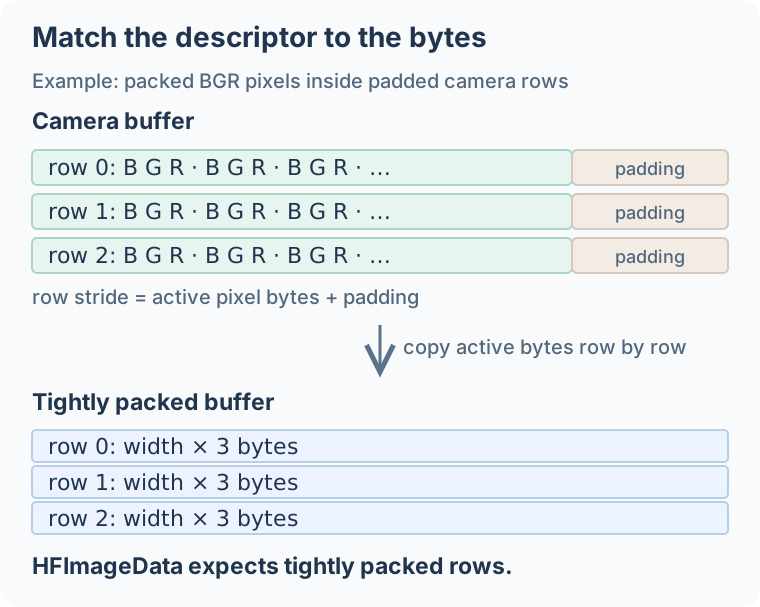
HFImageData expects the tightly packed layout shown above. Repack padded camera rows before passing them to the raw C stream API. For Android YUV_420_888, read each plane using its row stride and pixel stride, then pack the output in the declared format.
Raw C stream
/* pixels points to width * height * 3 tightly packed BGR bytes. */
HFImageData input = {0};
input.data = pixels;
input.width = width;
input.height = height;
input.format = HF_STREAM_BGR;
input.rotation = HF_CAMERA_ROTATION_0;
HFImageStream stream = NULL;
HResult status = HFCreateImageStream(&input, &stream);
if (status == HSUCCEED) {
    /* Run detection and any downstream calls using this frame here. */
    HFReleaseImageStream(stream);
}
The stream borrows pixels; the application owns the buffer. Keep it alive and unchanged until all stream operations have finished, then return it to the camera or reuse it.
An existing stream can be reused with HFImageStreamSetBuffer, HFImageStreamSetFormat and HFImageStreamSetRotation. Check each status and ensure no processing call is using the old buffer at the same time.
File and bitmap input
HFCreateImageBitmapFromFilePath decodes an image and owns its storage. In 1.2.4, HFCreateImageStreamFromImageBitmap copies those pixels into independent stream storage. You can then modify or release the original bitmap. Release both handles when each is finished.
For a first integration, the C detection program uses this path. Use it to check the SDK setup before connecting a camera.
Apple camera and memory inputs
The Apple wrappers accept CVPixelBuffer directly when it contains tightly packed BGRA, RGBA, Gray or NV12 pixels. The stream retains and locks the buffer until it closes or replaces its input. No pixel copy is made by this constructor.
#import <InspireFace/InspireFaceApple.h>

// session is initialized; buffer uses a supported tightly packed layout.
BOOL CountCameraFaces(IFSession *session, CVPixelBufferRef buffer,
                      HInt32 *count, NSError **error) {
    IFImageStream *stream = [[IFImageStream alloc]
        initWithPixelBuffer:buffer rotation:HF_CAMERA_ROTATION_0 error:error];
    if (!stream) return NO;
    @try {
        return [session withBorrowedFacesFromStream:stream
            body:^(HFMultipleFaceData faces) {
                *count = faces.detectedNum;
            } error:error];
    } @finally {
        [stream closeWithError:nil];
    }
}
import CoreVideo
import InspireFaceSwift

// session is initialized; buffer uses a supported tightly packed layout.
func countCameraFaces(session: FaceSession, buffer: CVPixelBuffer) throws -> Int {
    let stream = try ImageStream(pixelBuffer: buffer, rotation: .degrees0)
    defer { try? stream.close() }
    return try session.withUnsafeFaces(in: stream) { faces in
        faces.count
    }
}
The constructor rejects padded rows and NV12 planes that do not form one contiguous packed allocation. A camera buffer can have either layout, even when the requested pixel format is BGRA. Check CVPixelBufferGetBytesPerRow; use the complete BGRA row-copy example when padding is present. Do not replace the byte stride with the image width without moving the pixels.
For bytes already in application memory, Swift can keep the stream inside the allocation's pointer scope:
import InspireFaceSwift

// bgra holds width * height * 4 bytes, without padding between rows.
func countPackedFaces(session: FaceSession, bgra: inout [UInt8],
                      width: Int32, height: Int32) throws -> Int {
    try bgra.withUnsafeMutableBytes { bytes in
        try ImageStream.withBorrowedBytes(
            bytes, width: width, height: height, format: .bgra
        ) { stream in
            try session.withUnsafeFaces(in: stream) { faces in
                faces.count
            }
        }
    }
}
Finish detection, analysis and feature extraction before leaving these scopes. Do not return the stream or its borrowed face pointers from a withUnsafeMutableBytes callback. For a file image, Objective-C IFImageBitmap and Swift ImageBitmap own decoded storage; snapshotStream copies pixels into an independent stream. See the Apple examples for file loading and error handling.
NumPy input
Use uint8 arrays with shape (height, width, 3) for BGR. Current Python also accepts (height, width) gray and (height, width, 4) BGRA arrays. To make storage explicit:
import numpy as np
image = np.ascontiguousarray(image, dtype=np.uint8)
faces = session.face_detection(image)
For float input in [0, 1], scale the values to [0, 255] before casting to uint8. For an RGB image loader, convert to BGR or create an explicit RGB ImageStream.
Rotation and display coordinates
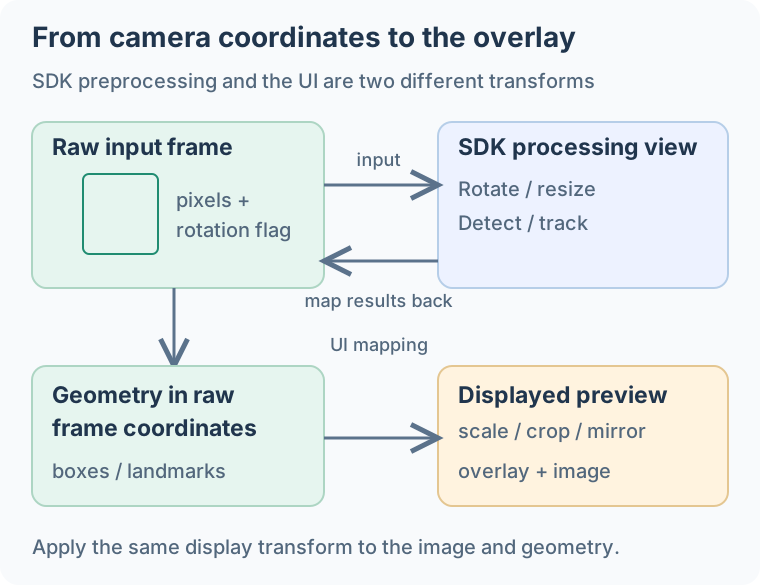
Keep three coordinate spaces distinct:
- Raw frame: width, height and byte order of the buffer submitted to the SDK.
- Upright processing view: the SDK's rotation/preprocessing view used for detection.
- Displayed preview: the UI's scale, crop, letterboxing and optional mirror transform.
The SDK maps face geometry back to input-frame coordinates. Apply the UI preview transform to those coordinates, including any front-camera mirror.
The native HF_CAMERA_ROTATION_90 and _270 conventions are counter-clockwise. Camera APIs may report a clockwise correction. Translate that convention explicitly, or rotate the bytes into an upright frame yourself and pass HF_CAMERA_ROTATION_0.
For an overlay, validate with a face near each edge of the image. If the box is correct at the center but drifts toward the edges, the preview crop or scale is often missing from the mapping. If it moves in the opposite direction, check mirroring.
Copies and asynchronous work
A detection snapshot retains detection data. For queued feature extraction, keep the snapshot together with its matching frame or a pixel copy. For box overlays, copy the geometry values and release the frame when image processing has finished.
The capture module returns frame IDs for selected candidates. Keep the corresponding images in a bounded cache keyed by those IDs, and encode the selected image when saving it. See face capture.
Need preprocessing outside the SDK?
The standalone InspireCV Task API accepts raw image views with row strides and writes into images or tensor buffers. Use its own PixelFormat values; map formats explicitly when moving between Task, HFImageFormat and InspireFace's FrameProcess.